iOS Architecture 101
How do I structure my app so I don't hate it in 6 months? Learn to write code so neat and intuitive, you'll actually enjoy maintaining it.

Launch Offer
Don’t miss out on this fantastic opportunity to secure your spot in our presale and enjoy a 50% discount.
Use Code "LAUNCHDISCOUNT50" for 50% OFF
Expires November 17th 2023!
SwiftUI is fast to build with. That's the whole selling point.
It's also why your codebase looks the way it does right now.
New screen? New file, a few @State properties, a .task, done. Need the same data somewhere else? Copy the network call. Need to pass something down? Binding. It compiles, it runs, it ships. So you keep going.
Then you're twenty screens in and the speed that got you here is working against you.
Here's what that looks like day to day.
- The same networking code is copy-pasted across half the project. You fix a bug in one place and forget the other three.
- Views that started as UI now own business logic, networking, and state management. Some are 300+ lines and nobody wants to touch them.
- No consistent approach to state. Some screens use @State, some @Environment, some pass bindings three levels deep. Every file looks like a different developer wrote it, even when it was just you.
- You want to reuse something and you can't because it's buried inside a View that does six other things.
- You open a file you wrote two months ago and you can't follow your own data flow.
The truth is:
You need structure. But not the kind where every feature requires five files and a one-line change ripples through four layers. That just trades one mess for another.
You need the kind of structure where you know which patterns to apply and where to stop.
One that helps you add a feature without hunting through the entire project for where it belongs.
One that helps another developer navigate your code without a walkthrough.
One that starts simple and grows with your app. Add a service layer when you need it. Introduce a repository when it earns its place. Modularize when the codebase demands it. Not all upfront. When the complexity calls for it.
SoC, MVVM, dependency injection. The patterns used across the industry. The ones you'll see in every production codebase and every senior iOS job. You just need to see how and where to apply them.
That's what this course teaches. Let me show you.
Build SwiftUI apps that are easy to understand, change, and grow:
iOS Architecture 101: From Messy to Organized
The step-by-step course that teaches you the design patterns behind well-structured SwiftUI apps. See each one applied to real code. Then study how they all come together in a 20+ screen reference app with real complexity.
Turn messy SwiftUI code into a clean, organized codebase you can build on with confidence
Here's how iOS Architecture 101 works:
Step 1: Learn the patterns that matter
You start with the core design patterns used in production SwiftUI apps. SoC, MVVM, dependency injection, repositories. Not just what they are, but why they exist, when they earn their place, and when to skip them. Every pattern is taught with real before-and-after code so you see exactly what changes and why.
Step 2: Apply them to real code
No contrived examples. You work through hands-on refactoring exercises with realistic starter code that looks like the kind of SwiftUI you've actually written. Messy Views, duplicated logic, tangled state. You apply the patterns yourself and see the code transform step by step.
Step 3: Study a production-scale app
This is the part that doesn't exist anywhere else. The Eco App is a full production-style SwiftUI app with 20+ screens, multiple subflows, shared state, and real dependencies. Every pattern from the course is applied. You open it, study it, and see how it all connects at scale. It's your reference for every project going forward.
After completing this course, you'll be able to:
- Open your project and know exactly where everything belongs.
- Add features to a 40-screen app the same way you'd add one to a 4-screen app. Same patterns, same confidence. ✅ Spot a messy View and know exactly how to break it apart, what to extract, and where it goes.
- Stop copying networking code, business logic, and state management from View to View.
- Choose between @State, @Environment, a ViewModel, or a service layer without hesitating, because you understand the tradeoffs.
- Have new teammates navigate your codebase without a walkthrough.
- Speak up in architecture discussions and back your decisions with real reasoning.
- Come back to the Eco App as a reference whenever you're structuring a new project or cleaning up an existing one.
The Architecture Roadmap: Where This Course Fits
Most developers get stuck at Level 1 — only writing UI code. Architecture is what lets you move beyond that.
The instant you join, you’ll get:
Module 1: Design Patterns and Architectural Mindset
Your app works, but one View has grown to 400+ lines. It holds the layout, the state, the network calls, and the logic, all mixed together. A small change breaks something unrelated, and you can't explain why code lives where it does. But splitting everything into tiny pieces doesn't fix it either: now a simple change means jumping through ten files. This module teaches separation of concerns, and how to find the balance between too little structure and too much.
- Break a 400-line View into parts that each have one clear job
- Learn separation of concerns (SoC), the idea behind MVC, MVVM, VIPER, and every other architecture pattern
- Define what each part is responsible for, and how the parts connect
- Recognize over-abstraction: when splitting code makes it harder to follow
- Compare a simple and an over-engineered codebase on the same tasks, and see when extra structure pays off
- Know the goal: code that’s simple, consistent, and easy to explain in your PRs
Module 2: MVVM Fundamentals
When a View gets too complex, you can add a layer behind it that holds UI state and the methods that change it: the ViewModel. MVVM comes with a lot of confusion and arguments about how to do it right. This module clears that up.
- Know when a View needs a ViewModel, and when local state is enough
- Use ViewModels to protect state, control how it changes, and reuse code
- Keep a single source of truth, with one place where each piece of state changes
- Keep ViewModels small and focused, instead of one ViewModel that does everything
- See why Core Data doesn’t fit well with MVVM, and which approaches work instead
Module 3: Services and Testing
Your ViewModels keep growing. They pick up more responsibilities until they do much more than back the UI. The same API call gets copied into every ViewModel that needs it. And a ViewModel that talks directly to the network or a database is hard to preview and hard to test. This module introduces the first supporting data layer: services. They’re small, focused helpers you plug into your ViewModels, one for each job. You’ll also see which conventions are industry standard, and why they help you in the long run.
- Build services for a REST API, the file system, and Apple APIs like LocationManager
- Apply dependency inversion with protocols, so services are plug-and-play
- Use mock services for previews and unit tests
- Write unit tests for async ViewModels
- Build screens preview-first, with sample data instead of a running server
Module 4: Repositories and Swift Concurrency
When data access gets more complex than a single service call, you need a repository. This module shows the repository pattern and how it orchestrates between multiple services. This is also where Swift concurrency gets serious: services work in the background, your UI runs on the main actor, and data has to cross between them safely.
- Build a data layer that fetches data from a server and has offline support.
- Know what runs on the main actor and what runs in the background
- Understand Sendable requirements and actor isolation, so the compiler stops fighting you
- Test async code with mock repositories
- Understand the design decisions behind this architecture, how it compares to other architectures, and how to explain it in a system design interview
Module 5: Dependency Injection (coming soon)
You now have ViewModels, services, and repositories. But how do they get connected? If a ViewModel creates its own services, you can't swap in sample data for previews or tests. And some things, like the store that keeps the user's login token, must be one shared instance for the whole app. This module shows how to pass the parts in SwiftUI, so every layer stays easy to replace and test.
- Understand what a dependency is, and why it's passed in instead of created inside
- Inject dependencies through the initializer, a property, or a method, and know when to use which
- Use the SwiftUI environment for dependencies the whole app shares
- Set up stateful dependencies, like a token store the whole app must share
- Know when a DI framework like Factory is worth it
Module 6: Connecting ViewModels to the UI (coming soon)
In a real app, the hard part isn't writing a ViewModel. It's deciding where it lives, when it runs, and how it connects to everything else. Create it in the wrong place and your data resets unexpectedly, or two screens show different versions of the same thing. This module brings the data layer and the UI together, using one reference project as the running example for every lesson.
- Compose your UI from subviews, screens, and flows, and organize your code to match
- Decide where in the view tree a ViewModel is created, and how long it lives
- Pass data between Views, and share state across the app with the environment
- Split a feature into several ViewModels and keep them in sync
- Understand the data flow through your app: View ↔ ViewModel ↔ Repository ↔ Services, with one clear direction of who calls whom (unidirectional data flow) and clear Swift concurrency boundaries between the layers.
Module 7: Scaling Patterns and Coordination (coming soon)
Requirements change, and your app grows. Picking an architecture on day one and sticking to it no matter what doesn't work. Instead, you start simple, add features, notice where it starts to hurt, and refactor. This module shows how to grow your architecture step by step, so you stop guessing where code goes and build apps that stay easy to understand, change, and grow.
- Choose between organizing folders by feature flow or by type
- Set clear boundaries and dependencies between features
- Weigh trade-offs: what changes for a small team versus a large one
- Prepare your app for modularization
- Know when navigation needs a coordinator
This is the reference project you've been looking for.
You've learned the patterns. You've applied them to real code. Now see how they all connect in one codebase.
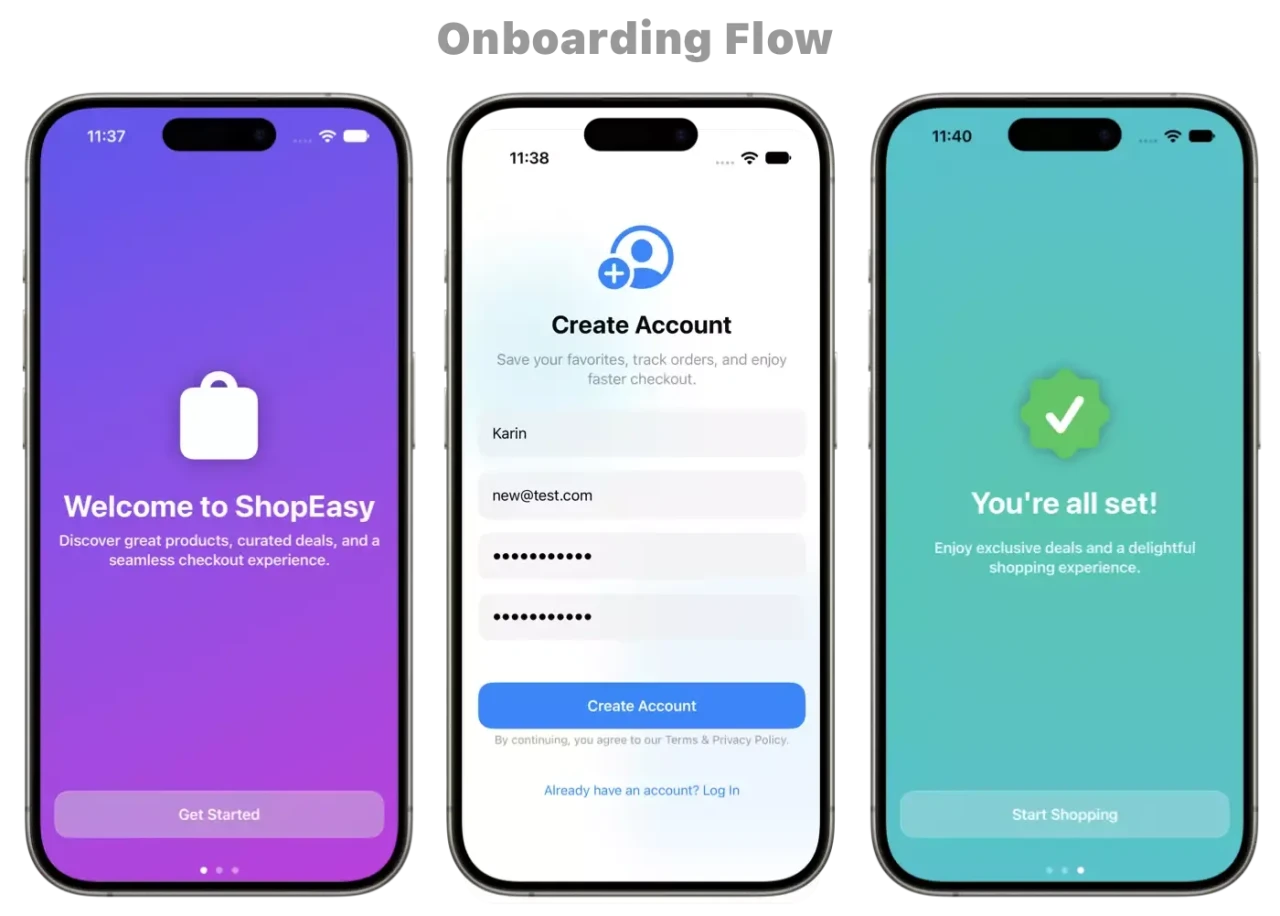
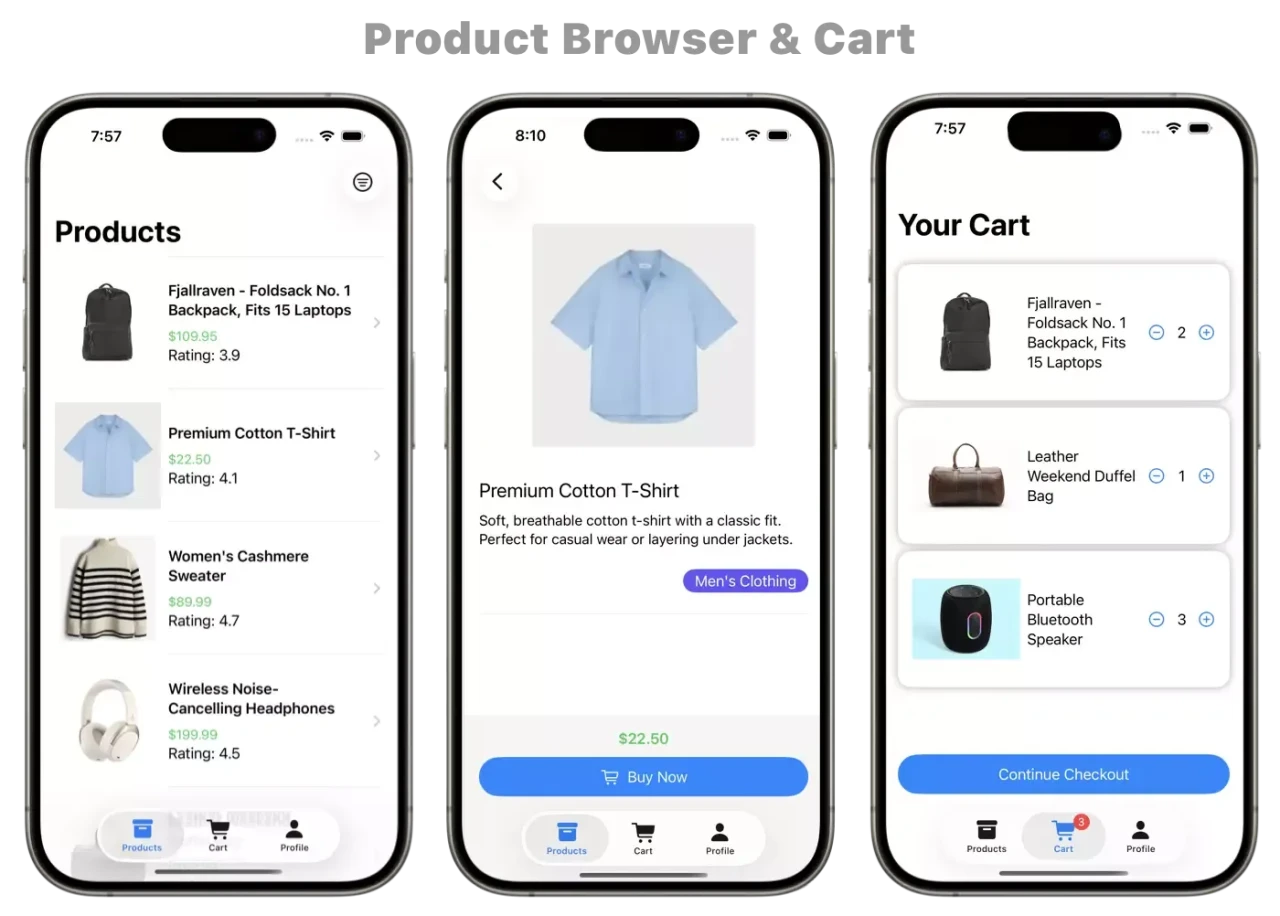
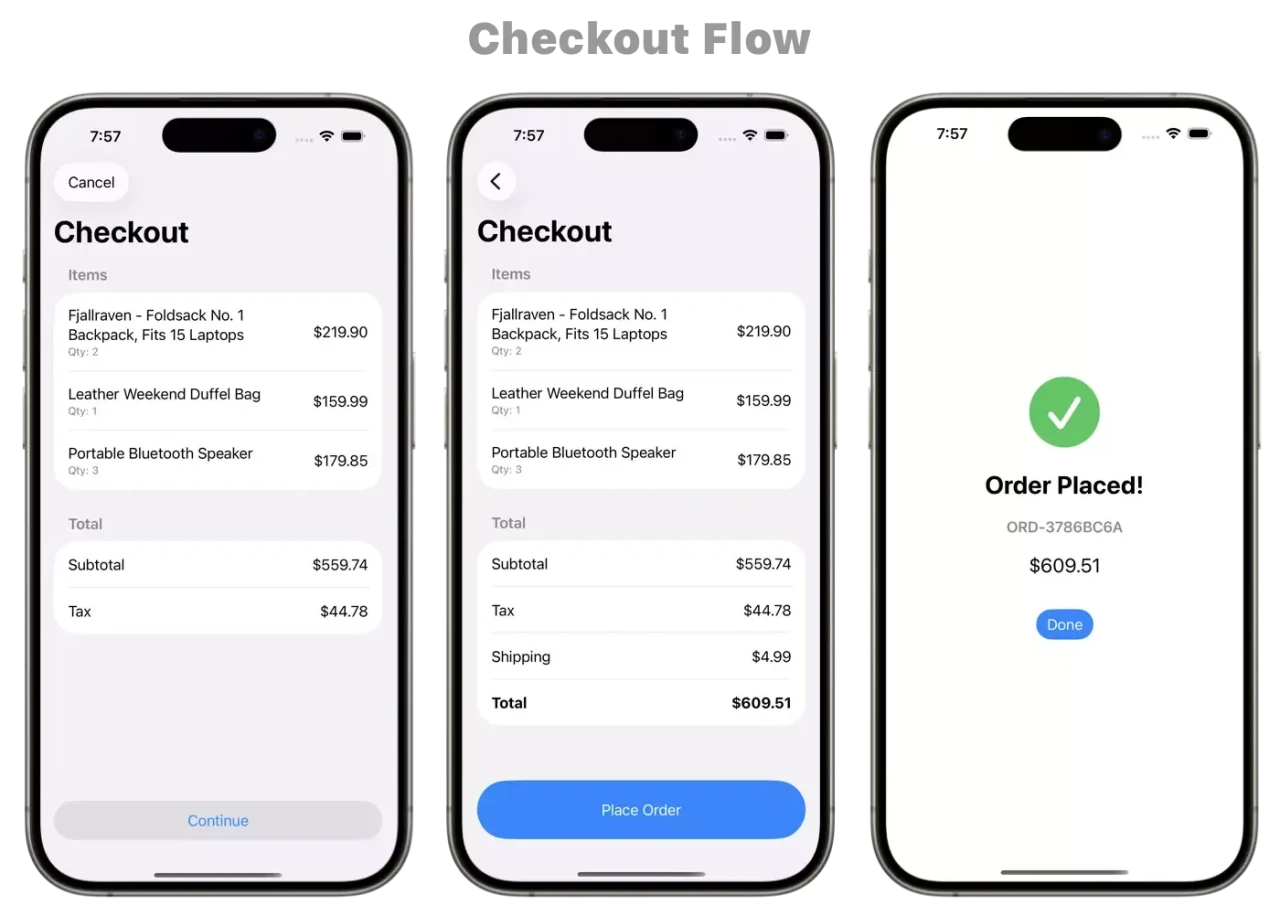
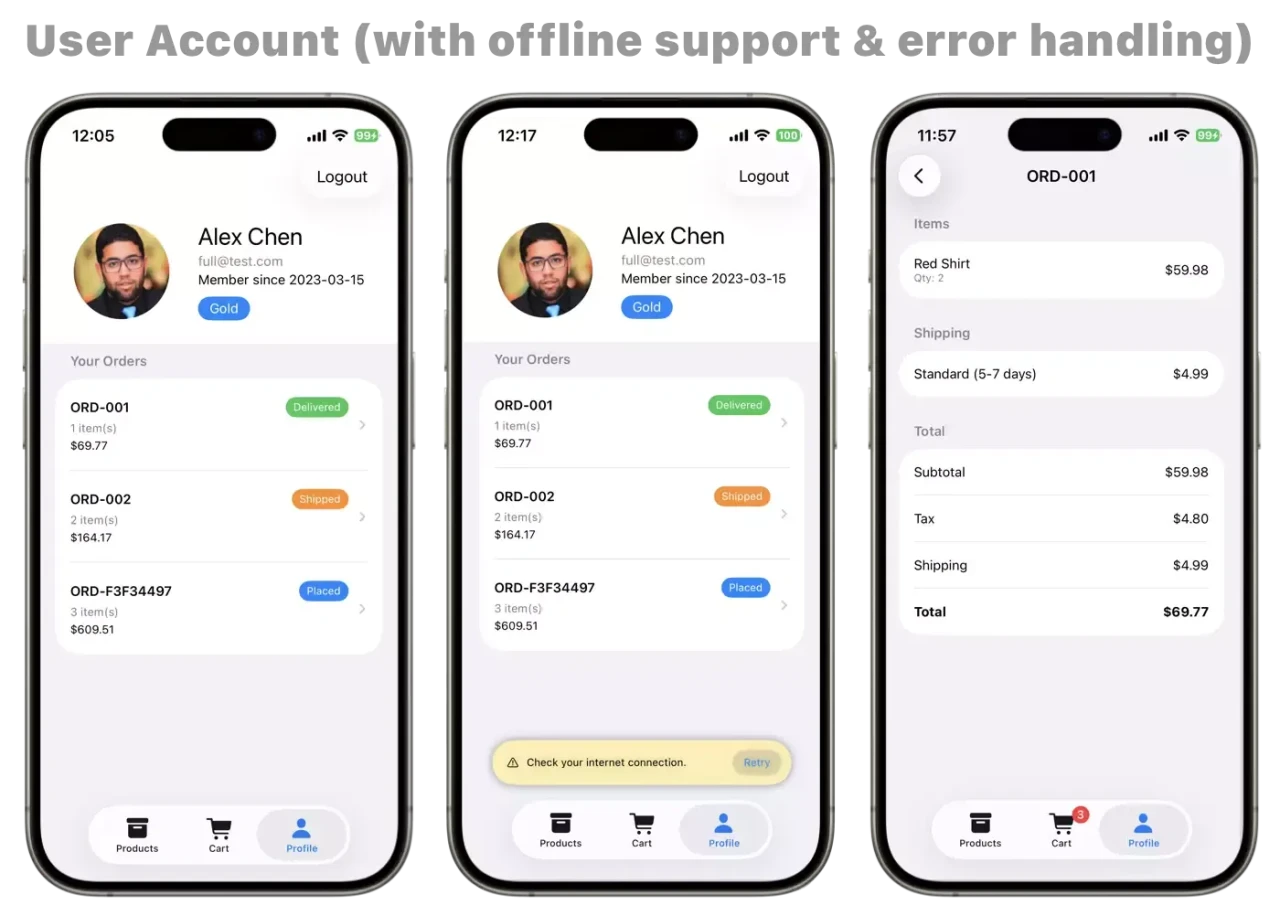
The Eco App is a full production-style e-commerce app built entirely in SwiftUI. It's not a todo list. It's not a two-screen demo. It's the kind of app you actually build at work.
Here's what's inside:
- 20+ screens across multiple navigation flows and subflows
- Shared state across features: onboarding, product search, login/sign-up, cart & checkout flow
- Multiple services and repositories working together
- Dependency injection wired through the environment
- Real async handling, loading states, error states throughout
- Clean folder structure organized by feature, ready for modularization
- A local server you can configure to simulate slow responses and error states, so you see how the architecture handles real-world conditions, not just the happy path
Every pattern from the course is applied here. Pick any feature, open the View, trace the logic into the ViewModel, follow the data into the service or repository, and see exactly how the layers connect. In actual Swift files you can run in Xcode.
This is what it looks like when it all works together.
Launch Offer
Don’t miss out on this fantastic opportunity to secure your spot in our presale and enjoy a 50% discount.
Use Code "LAUNCHDISCOUNT50" for 50% OFF
Expires November 17th 2023!
Finally Know Where Your Code Belongs
From messy 500-line views to clean, testable architecture
SwiftUI Architecture Course
-
Go from messy to neat and intuitive.
-
- What you will get:
- Video Lessons: MVVM, service, repository pattern, & DI
- A complex app where you can see every pattern working together
- The reasoning behind each architectural decision
- Data flow that works with SwiftUI, not against it
iOS Architecture 101 is for you if you're a SwiftUI developer who says yes to any of the following:
- Your Views are hundreds of lines long and you know logic doesn't belong there, but you're not sure where else to put it.
- You've used MVVM before but your ViewModels became the new dumping ground.
- You've copy-pasted the same networking code into multiple Views because there was no shared layer to put it in. You open a file you wrote a few months ago and can't follow your own data flow.
- Every new feature starts with "where does this go?" and nothing in your codebase gives you a consistent answer.
- You've watched MVVM tutorials and understood the concept, but your real app has dozens of screens and none of it transferred.
- Your team's codebase has a different approach in every folder because every developer had a different idea.
- You've tried to add more structure but ended up over-engineering it. Five files per feature, changes rippling across layers, dependency cycles.
- You understand design patterns in theory but you can't confidently apply them to a real project with real complexity.
- You want to be taken seriously in architecture discussions but you don't have the reasoning to back your decisions yet.
Frequently Asked Questions (FAQ)
I already know MVVM. Will I learn anything new?
Knowing MVVM and implementing it correctly are different. We'll show you the 10 ways MVVM breaks in production and how senior developers prevent each one. You'll learn when to break MVVM rules, how to handle edge cases, and why certain patterns exist beyond the textbook definitions.
Why not just read blog posts?
Blog posts show perfect code. We start with YOUR messy code and refactor it together. You'll see exactly why each decision matters for YOUR specific problems. Plus, blog posts can't answer your questions about your actual production code during live Q&A.
Is this worth it if I'm self-taught?
Absolutely. This course is designed for developers who build things that work but want to understand WHY certain patterns exist. We start with code you write today, not theoretical perfect code.
Do I need prior iOS experience?
Yes, at least 1 year. You should be comfortable building basic SwiftUI views and understanding Swift syntax. This isn't a beginner course - it's for developers ready to level up their architecture skills.
What if my team uses different patterns?
I teach principles, not rigid rules. You'll understand WHY patterns exist, so you can adapt to any team's approach. Plus, you'll be able to articulate why certain patterns might work better.
What version of iOS/Swift do you use?
iOS 26+ with modern Swift including @Observable macro (not the old ObservableObject). We focus on current best practices, not legacy patterns. All examples use SwiftUI with the latest concurrency features.
First Week Confidence Guarantee
Try it for 2 Weeks. If it's not transforming how you think about iOS architecture, get a full refund.